Tuesday, May 25, 2010

Little C's Challenge - Sketch Challenge and 12 Petal Flower SVG, SCUT, GSD File

Hello Friends!! It's Tuesday and that means it's Little C's Challenge time again! Stop by the Little C's challenge site and play along! There's a prize to be given out for the winner! Whoohoo! I decided to use my TGF stamp to create this card. You can find the Greeting Farm stamps at Little C's. . .Jen is selling all her rubber stamps at 40% (not including the grab bag stamps). Use this code "GoodBuy40" when checking out to receive your 40% discount. The grab bag stamps will need to be purchased separately.

This week's challenge is a sketch challenge. It was a simple sketch and a fun one too! Yay! Be sure to stop by Jen's and Mackenzie's blogs to check out their sample for this week's challenge!

I actually colored this girlie a while ago but haven't had a chance to use it. I thought this was a nice time to create a card with it. Do you see the big bow? A few days ago. . I went on an adventure in my garage. I store a lot of my crafty stuff in containers in the garage. . .ones that I really don't use.

Well, a few years ago, I bought a butt load of ribbons from Ebay that were a mixed lot. Many of the ribbons were wide . . I picked out the ones that I wanted to use and stored the rest in a container. Well. . .lo' and behold, as I was looking through the ribbon container, I found a bunch of pretty ribbons that today, are perfect for my cards. In the past I used 1/4" ribbons but now, I use more of the wider ribbons and the ribbons in the container were like a gold mine! Wow, lots of pretty ribbons. I'm so glad I kept them and did not resell them on Ebay. I can't wait to use the ribbons on my card!!

I colored my image with my copic markers. I cut the flower shape on my Cricut using an SVG file that I created. I have a lot of flower files but I wanted a specific one that matched the sketch for the challenge. I didn't have one so I created my own flower file. It's a 12 petal flower. It's a very simple flower but there's multiple use for it.

Here are the files in SVG, SCUT, and GSD. . .they're free. . .just sharing.


To download SCUT file, Click on the image
To download the SVG file, Click Here
To download the GSD file, Click Here

Well. . .hope you'll play along in the challenge! Hope you all have a beautiful Tuesday!!!

Sunday, May 23, 2010

My Scrap Chick Bigger Bag and Flower Combo Gift Set

Hey, hey Friends! Happy Monday! How was your weekend? I had a pretty laid back weekend . . .as most weekends! I did a bit of crafting but not much. I don't craft much on the weekends. There's too many distractions so I try to get something done when I can.

I did manage to make this gift set using myscrapchick.com cutting files. I'm in love with the "Bigger Bag" files. The bags/box files are just so fun to use and create all sorts of different types of bags and boxes. My goal is to use them all at least once. . .:)

Whooooaaa! That's a big flower on your card, Maria! LOL! I know, it is huh? I guess it's the type of card that won't go in an envelope. . .it's possible but more like a packaging envelope. Despite how big it is, I like it on my card.

I created the flower using the "Flower Combo" files. I wish I had the time to create a tutorial of all the different flowers you can create with this files. I created quite a few handmade flowers and all very different. This file set is perfect because of the different flower shapes in this file.


Here is the matching bag using the "Bigger Bag" file set. With this bag I decided to create a purse by putting a lace handle. The flourishes on my card and bag design was created using the "$1 Simple Flourish" file. Isn't it pretty?


Here is a photo of the pretty flower again. Doesn't it look like a carnation? I'm also really into using lace lately. . .I have a bunch of them so don't be surprised to see more of my cards and projects using lace.

This weekend I was going through my craft containers that I store in the garage and looked through a bunch of my rubber stamps and I decided that some time this summer, I'm going to sell a few of them on Ebay. I kept them for so long because I have separation anxiety when it comes to my craft stuff! LOL! But as I was looking through trying to pick out stamps that I wanted to use, I just didn't have the same thrill that I once had when I first bought them. A lot of them are Stampin Up stamps. I just have way to many of them. I don't know. . .I have to think about it but yeah. . . .I don't love them as much as I once did. . . .so letting go may be something I need to do. Sounds like I'm breaking up a relationship! LOL! In some sense, it is, I suppose!

Anyway. . .that's it for today. I hope you all have a beautiful Monday!!!

Post It Note Covers and Stampin Up Echoes of Kindness

Hi Friends!! I bought a bunch of dollar decorative post-it notes at Michaels. . .wow, a long time ago. I bought them with the purpose of creating covers for them but never got around to doing it. As I was going through a basket of craft stuff, I came across them and rather than just looking at them thinking I'll do something with them one day, I decided to finally work on creating the covers for them.

I was going to create a tutorial but I realized that the post-notes aren't the standard size post-it notes. They are a little bigger so I'll work on a tutorial on the standard sizes instead.
The covers open up reveal the decorative post-it notes. I used the colors of the flowers to create the cover. I actually have more of these post-it notes but decided to post these two that I already made. I'm going to do something different with the others.

Do you see the images on the covers? Well, they're from the Stampin Up "Echoes of Kindness" Set. I bought the set I think 6 months ago and have never gotten around to using them. What's new, right? LOL! This time, rather than coloring with my Copic Markers, I decided to watercolor the images instead. I haven't watercolored for a long time. Do you see the white highlights? Well, I used white acrylic paint to create the highlights on the image. Acrylic paint works nicely to create highlights on your images. Try it out. . .:)

Anyway. .. that's it for today. I hope you all have a beautiful glorious Sunday!!

Saturday, May 22, 2010

Scrap Pile Saturday Challenge #12 - Hearts and Large Scallop Border SVG, SCUT, GSD file

Hello Friends!! It's Scrap Pile Saturday Challenge time again!! I'm sorry I didn't post the challenge last week! I was busy cleaning my craft room and forgot to post it! This card was suppose to be last week's challenge but since I didn't post it, it's this week's challenge.

Before we begin with the challenge, I'd like to highlight the motivated and talented ladies who decided to play along with SPS Challenge #11. Check out the cute cards they created:

Tracey of My Creative Place
Sheryl of Sheryl's Crafting Corner
Jan of Tweet Designs

Just to let you know. . .if you want to play along and want to refer back to this challenge, at the top corner of my blog, click on SPS Challenges or at the top, before my posts, I also included a link. That's where all my Scrap Pile Saturday challenges are located.

Now to this week's challenge:

Hearts Challenge. The challenge is to create a card and apply at least 3 hearts shape to your card. It can be from chipboards, embellishments, stamped images, punched hearts, etc. The minimum is three hearts. Simple enough huh? Hope you'll play along this week!

Okay, here are the rules:


1. Other than your card/project base, the face of your card MUST be created using ONLY designer paper and card stock from your scrap pile. Do not cut up any new card stock or designer paper. This rule also applies to 3D projects such boxes, bags, etc.

2. Embellishments added to your card MUST be from "opened" packages. Do not open up a new package or roll of ribbon, brads, buttons, etc.


What inspired this challenge? Well, do you see the big heart? Well, I've had this heart chipboard for a long time and whenever I go through my scrap pile, I always come across it but I never was motivated to use it because of the size of the heart. Last week I decided to just use it.

I wanted a large scallop border for my card but all my scallop punches were small scallops so I decided to create my own scallop border. LOL! Hey. . .if you don't have it, find a way to get it. . .that's my philosophy. . .:) It helps that I can create my own files.

The stitches are hand drawn using my Sakura gel pen. I really should use my sewing machine more often but me and my sewing machine are not friendly with one another. It hates me. . .I wonder how I can get it to be nicer to me. It always gives me heartburn because it won't cooperate. Even a simple stitch is a huge undertaking. Me and my sewing machine need to settle our differences. LOL!

Okay here is the scallop border that I created. It's very simple and you probably already have a large scallop border but I didn't. I figured I'd share it anyway because not all of us have every cutting files available. Hey. . .I do know a few people have all the Cricut cartridges. That's a huge investment. . .not me, I think I only have 4 cartridges total. I prefer to create my own because I'm not rolling in a ton of dough. . .if you know what I mean. People like me have to find creative means to acquire things. . .:)


To download the SCUT file, click on the image
To download the SVG file, Click Here
To download the GSD file, Click Here

Please click on the appropriate file that works with your program and cutting machine.

Just to let you know. . .the SCUT file's width is 5". I created it at that size to accommodate my card but you can adjust it to any size you want. . .:).

Hope you'll play along this week! Hope you have a wonderful weekend!


Friday, May 21, 2010

Christmas Stampin All Year Long Challenge #50 - Paper Piecing


Hello Friends!! Well it's Friday and it's that time again! What time? Well it's Christmas Stampin All Year Long Challenge time! Can you believe it but there's only 6 more month until Christmas? I can't believe how quickly time has flown. It's almost 2011! LOL!

This week's challenge is a fun challenge! The challenge is "Paper Piecing". I love paper piecing. It just add something more to your stamped image. . .something you can't achieve through coloring. The results are so pretty.

Stop by Christmas Stampin All Year Long and check out all the pretty cards the design team created. The design team did a wonderful job with their paper piecing. Hope you'll play along this week!!


I decided to use my InStyle Stamps image. Isn't she a cutie or what?? Okay. . honestly, this card almost turned into a major disaster. Do you see the fluffy snow? Well I used Liquid Applique and I heat embossed it to give it the puffy look. Well. .. I thought it was dry and I sort of accidently smeared it on various parts of the card. I wanted to SCREAM. . .luckily, I found ways to fix the mess up!!

I colored my image with my Copic Markers, embossed the background with my CB embossing folders, rubbed a bit of white pigment ink to the embossed snowflakes, added Liquid Applique and Stickles to create the snow and paper pieced the Stampin Up designer paper to my image! That's about it!

Life has been so busy the past week. I'm so glad it's Friday! I can't wait for the weekend. Hopefully, I can catch up on life stuff. . .there's so many things to do! Chores, chores, chores. . .uggh. The bane of my existence!! Life would be perfect if only I had a maid. LOL!

Anyway. . .I'll shut up now. . .hope you all have a beautiful Friday!


Thursday, May 20, 2010

Pink Cat Studio Digi Stamp Release, Multi-Fold Pocket Card SVG, SCUT, Template and Tutorial


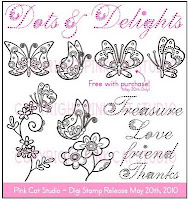
Hello Friends! This is going to be a long post.. . just letting you know!! I'll try to keep the commentary to a minimum. . .:) Today is a fun day because it's the release of the Pink Cat Studio digital images!! Yay! This week's images are all about dots and butterflies!! To view the awesome cards by the design team, stop by the Pink Cat Studio blog.

If you purchase a digital image or the set you'll receive a free digi image! Whoohoo! But. . .it's only free today!!! So go get'em now!! There's also bonus word art with each purchase so lots of bonus goodies going on at Pink Cat Studio.

Just a little info on my first card. . . the leaves cut out shape on my card was created using my Cricut cartridge "Wild Card". . . .:) I thought it would go nicely with the butterfly image. You can't really see that it has a leaves shaped cut out to the front of the card . .. maybe I should have used a solid base so it would show up more. You can find that pretty Prima flower at Little C's.

This is actually a box and not a card. I decided to create a shadow box type of project rather than a card. The box shape was cut using, again, the Cricut cartridge "Wild Card".


Wow. . .lot's of bright colors on this card! LOL! I created the layered flower using myscrapchick.com file "Cut Flowers".

I decided to create a multi-flap pocket card with this card. It opens up to reveal a pocket. Just to let you know. .. all the designer papers I used on all my cards are by K&CO and card stock by Stampin Up. I colored all the images with my Copic Markers!!

As you can see it opens up to reveal a pocket. You can't tell in the photo but the blue background is actually an insert inside the pocket.

I created a tutorial a few months back that is similar to the template I created for this card. The fold is slightly different but very similar. If you don't want to use the template and prefer the tutorial: Click Here

For the SVG, SCUT, JPEG, or PDF file. . .scroll down. .. :)


To download the SCUT file, Click on the image
or
To download the SVG file, Click Here

With the SVG file, when uploading to your SCAL or other program, to create a 5.25 x 5.25" size card, adjust the height to 8.25" and "keep the proportion". When scoring, follow the score line as shown on the hand cut template below.


To download the JPEG file, Click on the image

To download the PDF file, Click Here

The template is already resized to print as a 5.25 x 5.25" card if you download the PDF file. If you want to modify the size, download as a JPEG (by clicking on the image) and adjust the size as desired.

Okay. . .sorry for such a long post. . .be sure to stop by Pink Cat Studio and check out all the fabulous digital images and stamps they carry!!! I guarantee you'll find an image you'll love!!

Hope you all have a wonderful Thursday!!

Wednesday, May 19, 2010

My Scrap Chick Merry Berry and Daughter Graduation Layout

Hello Friends! Well I worked on a layout yesterday. . .I'm still struggling with creating layouts because I primarily create cards and 3D projects. I'm getting a little better at it. . . .faster that is.

Ummm. . .Ms. Graduation Bear looks a little big, huh? Well, I didn't realize I cut her so big until I already cut her on my Cricut. I'm the sort that never waste anything so I decided to work with her anyway. It's the frugal girl in me. The bear was cut using the myscrapchick.com "Merry Berry" file. The file has different bear costumes and whata ya' know, there was one with a graduation costume. Perfect!!

My daughter graduated last year; hence, the '09 date on the sign.


I took a ton of photos of my daughter when she graduated from high school. I would like to create a few more graduation layouts. The colors of my layout are the colors of my daughter's school. No. . .I didn't choose the color combo. If I had my choice, I would use other colors!

Anyway. . .not much else to talk about today. Be sure to stop by myscrapchick.com and check out all their awesome files for your Sure Cuts A Lot and other cutting programs/machines. They have a ton of fun stuff there!!

Hope y'all have a beautiful Wednesday!!


Tuesday, May 18, 2010

Little C's Challenge - Embossing Challenge

Hello Friends! It's Tuesday and lots of fun stuff going on in blog land. Be sure to check out my previous post . . .Pink Cat Studio is having a contest going on. . .:) The other fun thing going on is the Little C's Challenge!! Yay! Another fun challenge this week. . .it's all about embossing. You can emboss with embossing folders, heat emboss, whatever emboss as long as something is embossed on your card! LOL! Stop by Jen's and Mackenzie's blog to check out their cute samples!!

I decided to use my "Happy Birthday" CB embossing folder! Do you know. . .I don't think I ever used this embossing folder. I had it for at least 2 years. . .it just sort of got lost in my pile of stuff. I decided to use the cute Tina Wenke image that you can purchase at Little C's! If you don't know by now Little C's is clearing out all of their rubber stamps at 40% off so be sure to go get your stamps before they run out. When checking out be sure to add this discount code "GoodBuy40".


I had colored this image like ages ago! I'm serious. .. I found it as I was going through my pile of colored images. Can you believe it? I color a lot of images but I don't have the time to make the cards for all of them. I'm hoping that I'll be inspired one day to just create cards with all of the images I've colored. Maybe I'll set a goal to do that! That would be nuts if I could make cards for all of them. .. it would mean a lot of cards! I just need to set my mind to doing it.

Just to let you know, I used myscrapchick.com "cut flower" file to create the layered flower on my card!!

I'm not sure I'm liking all the white space on my card but I wanted to show that I did emboss my card. . .LOL! Okay. . .I'm in the middle of creating a scrapbook layout and me and scrapbook layouts are not quite friendly with one another right now. It takes a bit of "thinking" on my part when creating LOs so I better get back to working on it before I decide to work on something else that requires less effort on my part. LOL!

Be sure to play along in the Little C's challenge. This week's prize is a cute Whiff of Joy stamp that will be given to the winner. . .good luck!!

Hope y'all have a wonderful day!!

Related Posts Plugin for WordPress, Blogger...
 
Share |