Showing posts with label Scrapbook Project. Show all posts

Friday, January 7, 2011

Paper Wreath Tutorial

Hi Friends! A few days ago, I created a Paper Cone wreath. . .well, I finally finished the tutorial on how to create it. It's very simple to create and it's a wonderful way to use up some of those designer papers that you've been hoarding. . .LOL!

Depending on the size you want your wreath determines the size you cut the designer paper and the amount you will need. The wreath above measures 10" and required approximately 6 designer paper unlike the wreath below which measures 12" and required 8 designer papers. You can create any size you want. I'll probably make a few smaller ones. I posted the tutorial if you care to try it out!! Scroll down for the tutorial.

All of the designer paper used for this wreath are K&CO designer paper. I printed the "Beauty Lies Within" on to the designer paper and cut a circle. I added Prima flowers and a bow and that's basically it!

Gosh, I love Prima flowers. .they make everything look so pretty.


I decided to modify the photo and create a word art to use on my cards or projects. They can be used as labels or background design on your cards. Click on the photo and "save image" if you want to use it.

If you just want the word art that I created for this project, just click on the image and "save image".


Here is the 12" wreath that I posted a few days ago. For more detail on this wreath, click here.

Below is the tutorial. Check it out!

Paper Cone Wreath

I linked this project to these link parties:

Get Your Craft On Tuesday

Sunday, October 31, 2010

Reflections Scrapbook Album/Journal #3 - My Favorite Things - Food

Hello Friends! It's interesting because creating a "Reflections Album/Journal" is much easier than I expected. I think because I don't feel the pressure of creating a keepsake for my family. . .the process of creating the layout is so much easier. I care more about getting my thoughts and reflections written down and less so about how it looks. I can't believe how quickly I created this layout!

What am I going to do with my layouts? Well, many times when I look back at my life, I see how things have changed and how many things remain the same. It'll be fun to look back at my layouts, read what I wrote and look at the pictures I've taken. Although many of the pictures are of inanimate objects, they are photos that I have taken with my camera. Many are pictures I've taken using my cel phone and have posted on my Facebook profile. I take a lot of random photos when I'm out and about and many times, they are photos of food I've had for lunch or dinner.


This layout is the first page of "My Favorite Things" series. I'll have different series or topics in my album/journal . . .I think one of them will be "Dreams and Wishes". Anyway. . .about my layout. . .one of my favorite things is "FOOD". I love eating at nice restaurants but I tend to get out of hand sometimes. It's no wonder I need to lose at least 20 lbs. Seriously. . .food is good but it can be bad where my weight is concerned.

Anyway, here is what I journaled on the layout:

One of the things that make me happy is eating good food. Knowing I'll eat something delicious can make a "blue" day into a " beauitful " day. Unfortunately, it's not helping me as far as my weight is concerned.

Luckily, I do tend to eat more sea food than red meat. I don't eat a lot dessert or pastries either but I do occasionally like to treat myself to a nice yummy hot fudge brownie sundae. . .:)

One of the changes I do need to make is to start eating healthier and focus on cooking at home. One day I'll get to that point. Right now. . .well, it's bon apetite for me. . .

It's just a simple journaling/reflections. . .nothing thought provoking or interesting as a matter of fact but I just wanted to reflect a little on one of my favorite things in life. . .:LOL!

Hope you all have a wonderful Sunday!!


Wednesday, October 20, 2010

Halloween Gate Fold Double Accordion Mini Album Tutorial

Hello Friends! Sorry for the poor quality of the photos but I created this project over 2 years ago! OMG! I created the tutorial for a Stampin Up club I had a while back but I no longer have the club. I have a lot of tutorials that I have not transferred to this blog. The tutorials were stored on a website that I no longer pay for and well, I have to reconstruct the tutorials so that I can upload them to Scribd. Unfortunately, I am way to lazy or burnt out to reconstruct them all! LOL! But, I decided because it's a Halloween project, this would be a good time to post this tutorial.


The mini album opens up as a "gate-fold" and is held closed with Velcro on the back of the oval panel. The oval is actually optional and you can wrap a ribbon around the album to keep it in the closed position but I prefer the Velcro option.

When opened up, the pages alternate from left to right. It's just a fun way to view the pages.

As you can see the pages are laid out in an alternating fashion. I decided to add a bunch of Halloween photos that I took in the past of my husband and kids. This project may appear "complicated" or "difficult" to create but it's actually quite easy. It's not exactly a "quick" project but try it out anyway. After the first album, it gets a lot easier to create a second one. . .:)

I'm really sorry that I don't post daily on my blog anymore. I'm not sure what my future will be with this blog. I was thinking of taking a few months break after the new year starts but like everything in life, I always change my mind. There was a time when all I wanted to do was create, share, blog and create tutorials but I don't know, I think I'm burning out a little bit with paper crafting. Maybe a few months break will bring back the old feelings. I don't know. . .do you sometimes feel the same way?

I know of a lady who was crafting (wood cut/tole painting) for 25 years and she recently put all her craft stuff on sale. I went over to buy a few things and she had literally a thousand craft books, tons and tons of wood cuts for the tole painting, and a whole bunch of other craft items for sale. I asked her why she was selling all her things and she said that she suddenly. . .almost overnight just no longer had any desire to craft which for me is quite amazing. I still love crafting but I want to grow into other areas of crafting such as crocheting and sewing so maybe that's where I'm heading. .. I don't know. I still love paper crafting and don't think I'll ever stop doing it but I'd like to explore other craft areas. I think that's where I'll be next year. . .:) You know, working with different craft projects, sort of mix bag of various areas of crafting. . .we'll see.

Anyway. . .just sharing my thoughts. Below is the tutorial. You don't need a Facebook account to subscribe to Scribd but you do need to subscribe by providing your email address and a password in order to download or print the tutorial. If you don't want to subscribe, you can view the tutorial directly online on my blog or on Scribd. You have the option to view the tutorial full screen, scroll option, or book option. Email me if you have any questions.

Hope you all have a beautiful Wednesday!!

Gate Fold Double Accordion Mini Album


Wednesday, May 19, 2010

My Scrap Chick Merry Berry and Daughter Graduation Layout

Hello Friends! Well I worked on a layout yesterday. . .I'm still struggling with creating layouts because I primarily create cards and 3D projects. I'm getting a little better at it. . . .faster that is.

Ummm. . .Ms. Graduation Bear looks a little big, huh? Well, I didn't realize I cut her so big until I already cut her on my Cricut. I'm the sort that never waste anything so I decided to work with her anyway. It's the frugal girl in me. The bear was cut using the myscrapchick.com "Merry Berry" file. The file has different bear costumes and whata ya' know, there was one with a graduation costume. Perfect!!

My daughter graduated last year; hence, the '09 date on the sign.


I took a ton of photos of my daughter when she graduated from high school. I would like to create a few more graduation layouts. The colors of my layout are the colors of my daughter's school. No. . .I didn't choose the color combo. If I had my choice, I would use other colors!

Anyway. . .not much else to talk about today. Be sure to stop by myscrapchick.com and check out all their awesome files for your Sure Cuts A Lot and other cutting programs/machines. They have a ton of fun stuff there!!

Hope y'all have a beautiful Wednesday!!


Wednesday, May 12, 2010

My Scrap Chick Dad Word Album and Bear Camp Out

Hello Friends!! Hey. . ..I created a project way in advance of the actual event!! I'm so proud of myself. I'm usually behind and do everything at the last minute. I decided that I'll start working on projects a month in advance. This is a "Dad" word album that I created for my husband for Father's Day.

I used the myscrapchick.com "Dad Word Album" and "Bear Camp Out" files to create this project. Stop by myscrapchick.com and check out all the cute files they carry. . . maybe you can start on your Father's Day projects early too!

I didn't have any camping photos so I just used random photos. Do you see the bear roasting marshmallows and the bear with the hot dog in my first photo? Well, it's a cutting file from the "Bear Camp Out" file by myscrapchick.com. I think my next project is to create a card with that file set. Isn't it perfect for Father's Day?


Again, here is the bear from the "Bear Camp Out File". If you're wondering how I created the shading on the bear? Well, I cut the bear in a lighter color and using my sponge dauber, I rubbed ink on to the image to give the image a bit of definition rather than a flat look.


This is a photo of my daughter and my husband. My daughter and my husband are best buds. . .they are video game buddies! LOL! My daughter hangs out with him more than she does with me because my daughter don't like to craft!! This photo was taken on my husband's birthday.

Last but not least, this is a photo of my husband and his son (my step-son). this photo was taken when we visited Muir Woods in Northern California.

Anyway. . be sure to stop by myscrapchick.com and check out all the fabulous files they carry!!!

Hope you all have a wonderful Wednesday!!


Thursday, May 6, 2010

My Scrap Chick Shaped Cards and Tab Album

Hello Friends! Wow, I've got a lot of stuff to share today!! How are you all doing with your Mother's Day projects? I wish I was able to create more Mother's Day stuff but call it poor planning which isn't surprising for me. . LOL! I am the "fly by the seat of your pants" sort of person. I leave all the planning to my husband. . .he's a super planner. I'm not exaggerating. Fortunately, he has me to make his life less predictable!

Okay. . .this is a long post so let me get started. Before I begin. All shapes and cuts on my projects were created using myscrapchick.com cutting files. Just letting you know so I don't keep repeating myself.

I decided to create a mini album using the "$1 Tab Album" file for this album. I cut chipboards on my Cricut Expression then cut designer papers to cover the chipboard. I decided to use my "Bind it All" to bind my album. All designer papers used on this album are K&CO. I love their papers. . .the designs are so pretty. The created the pretty label at the front of my album using the $1 Floral Frames file. Isn't it pretty?


I used the "$1 Spring Flower" file to create the pretty layered flowers on my first page. Just a quick story about my album. I created this Mother's Day album for my daughter for Mother's Day. Isn't she supposed to create something for me? Yeah. . .but she's not the crafty sort.

My grandmother adopted me when I was a little girl and I considered her my mother but she passed away several years ago so I don't have a mother to give my Mother's Day album to. Therefore, the next best thing is to give it to my daughter.

The first photo was taken on a whale watching cruise several years ago. I look strange in the photo but I like how my daughter is hugging me so that's the reason I chose that picture. The second photo is a photo of us at my cousin's wedding. It's the only photo I have where we're both dressed up. I'm usually the one taking photos of others so I don't have many photos of me.


The next project are these bee hive cards. This is actually a sneak peek of the Shaped Cards that will be released tomorrow at myscrapchick.com. More shaped cards! Click Here to check them out!! Oooh, how fun! Last week another set was released: Click Here. Be sure to stop by myscrapchick.com tomorrow to check out the new shape cards being released.

I decided to create a fancy bee hive card so with this first card, I used a pretty designer paper. Although it looks like I did a lot of things with this card, all I did was cut the file on to designer paper, drew in the stitches and added the ribbon and sentiment tag. That's basically it but doesn't it look like I worked harder to create this card? LOL! Gotta love that, huh?

With this card, I decided to cut the file on regular card stock to give it a more traditional bee hive look. Again, I drew in the stitches, added a bit of Stickles glitter to the the bee's wings and added the ribbon and sentiment tag.

This second set of cards are also going to be part of the new Shape Cards file set that will be released tomorrow at myscrapchick.com. I decided to create a boy and girl version. The cute animal cuts are from the "Sweet Animal Books" file set. They are actually meant to be used to create mini animal albums but with the myscrapchick.com files, you can basically use the files for any type of projects. They are very versatile!! You just need to use your imagination!

I decided to use "cupcake" designer papers by DCWV for my "baby onsies" shaped cards. This is the girl version of the baby onsies. Creating these shaped cards are so fun! I get a kick creating them because it just brings my card making projects to a different level.

This is the boy version of the baby onsie card. It's the same design as the girl card but using different colors and different animal.

Anyway. . .let me close the post by letting you know that the second set of cute shape cards files will be released tomorrow but if you can't wait to create a few shaped cards, you can play around with the first "Shape Cards" released last week!

Okay that's it!! Hope you all have a beautiful Thursday!!

Sunday, April 25, 2010

My Scrap Chick Happy Tree Forest Scrapbook Layout

Happy Glorious Sunday Friends!! Well a miracle has occurred! I created a second layout within a week. LOL! It took 4 months to create one layout and wow, within 2 days I created the second one. Too funny. I'm determined to get some layouts done. It actually was easy to create this layout because I used the myscrapchick.com file "Happy Tree Forest". All of the images except the bird including the scallop shape was created using this one file. Stop by myscrapchick.com and check out all the AWESOME cutting files available. I'm seriously gaga over them. Also, be sure to sign up for the newsletter and receive a free file each week. Myscrapchick.com also has a fan page. . .if you're on FB, come join . . there's free files available for fans there too. Click Here

I used the scallop tree shape to create the cloud scallop shape. The tree shapes are actually quite versatile. You can create flowers and shapes for your card. I'll see if I can find the time to make something else with the shapes this week.

A little story behind this photo. When my daughter was little we lived in an extension of my aunt's home after my divorce and subsequent untimely death of my ex-husband (my daughter's father). It was just me and Alexis at that time but I've been blessed to have subsequently met my current husband a few years later. At that time, I was renting a small studio at my aunt's home and we had a really tiny bathroom with a shower. It didn't have a bath tub but I so badly wanted my daughter to experience everything that most kids were able to experience such as a bubble bath. How strange that a bubble bath would place any importance but it did.

Anyway. . .I would plug up the drain so that I could fill the shower area with water and my daughter would sort of crouch low so she could have a bubble bath experience. LOL! I mean, you can only fill up a shower to about a foot high so you can imagine how much bubble bath formula I had to put to have my daughter feel like she was surrounded by bubbles.

Today. . .well, life is so much better (convenience wise). . .but back then, despite what little we had, my daughter and I were very happy. Honestly, it's not what you have that makes life good, it's making what you have into something good. I really believe in that. Anyway. . .that's my story for the day.


Here is a close up of the tree cuts using the myscrapchick.com "Happy Tree Forest" file. I really had fun making this layout! I think I'm motivated to make another layout! LOL!

LO Details:

Paper: DCWV and K&Co designer paper, SU Close to Cocoa card stock
Ink: Tim Holtz distressing ink
Accessories: Myscrapchick.com Happy Tree Forest File, Cricut, buttons, Pressed Petals metal sentiment


OMG! I just had to share this. I saw it on Facebook and it made me laugh so hard.. . check it out. .it's hilarious!


Hope you all have a blessed and glorious Sunday!!

Friday, April 23, 2010

My Very First Scrapbook Layout This Year and Beauty Word SCUT File! Yay!

Hello Friends! This is my second post of the day. . .be sure to scroll down to check out the card I made for this week's CSAYL challenge. Okay. . .this is my very first scrapbook layout this year. It's hilarious because my New Year's resolution was to create a LO once a week. Ummmm. . .it's April and well, I guess I failed in fulfilling that resolution.

Honestly. . .scrapbooking is not my forte' but I have to start somewhee. I can't keep putting it off. I just applied a few cardmaking techniques to my layout. I don't know. . .I'm just a bit intimidated by the huge piece of paper! LOL! I'm accustomed to a small card layout so I sometimes don't know how to fill up a 12 x 12" LO. There's so much space. KWIM??

My daughter is 19 years old and I still need to scrap her baby photos! Ugggh! So sad. Well this is a photo of her at age 5. Boy, I have a lot of catching up to do. Way back when, there was no such thing as digital cameras and this photo was taken on a regular 35mm. I wish I had a digital camera back then. . .I would have taken more photos.

The designer paper is by DCWV called Maricopa. . .the paper is glittery and metallic. It's a very pretty paper stack.


I created the word cut "beauty" using my SCAL program so it's an SCUT not an SVG file. I used the font "Garamond Premr Pro" in the case you're wondering.


Click on the image to download the SCUT file for SCAL2

To create this butterfly, I used the myscrapchick.com "layered butterfly" file. It's only a $1 . . .it's so economical but such a pretty butterfly cut!! I used Scribbles Iridescent Paint to create the dots and added dew drops to the center of the butterfly.

I don't know when I'm going to create another layout. . .maybe in 4 months? LOL! Hopefully sooner. Maybe I'll really get into it one day. . .:)

LO Details:

Paper: DCWV designer paper and cardstock, K&CO designer Paper
Ink: Scribbles Iridescent Paint
Accessories: Dew Drops, myscrapchick.com Layered Butterfly file, SCAL, Cricut, SCUT


Hope you all have a wonderful Friday and weekend!!

Wednesday, March 31, 2010

My Scrap Chick "Mom" Word Album and Cut Flowers

Hello Friends! Let me tell ya'. . .I literally turned over my craft room to create this project! LOL! You're wondering "why". . .it's not like there's anything really complicated about it. Well, let me explain. . .I wanted to use my "Bind it All" and I could not find it. I cleaned my craft room a few months ago and I did not know where I stored it! Uggggh!! Anyway, the good thing is I found it, the bad thing is my room is now in a serious state of chaos!

Okay. . .let me talk about my project!! I created this word album using the $1 Mom Word Album cutting file from myscrapchick.com and using my Cricut Expression to cut the album. Do you see the layered flowers? I used the "Cut Flowers" file, again from mycraftchick.com! OMG! I am so in love with the files at myscrapchick.com and my Cricut. No more punching, no more hand cutting! Do you know much time I saved by having my Cricut cut all the shapes for me? This album would have taken me a few days if it weren't for the files and my Cricut but it only took me a day to finish up the album! I'm so happy about that!

Because there's a lot of photos. . .I'll write short captions for each photo. This is the front of the album. I used my K&CO designer paper and Making Memories metal and chipboard embellishments.


The flower next to the photo is another flower file from the $1 Cut Flowers file from mycraftchick.com

This photo of me and my husband and my grandmother and daughter. My grandmother (who adopted me when I was little) passed away a few years ago. I miss her immensely. I could tell you stories about her. . .she was such a strong woman. . .she endured a lot of hardship. . .I'll talk about her another time.

This is a photo of me, my daughter and my grandmother. I created the sentiment by using a scrapbooking program and used the "word art" feature to create the rounded effect.

Another close up of me and my husband's photo.

A close up of my grandmother and daughter's photo. I created the heart shape and sentiment using my Photo Shop program.


These two photos highlight the layered flower using the "Cut Flowers" file. All I did was adjust the size of each flower cut by 1/2" each and layered the flowers after cutting them.

Anyway, be sure to stop by myscrapchick.com and check out all the fabulous $1 files. You'll love them as well as all the other files!

Hope you all have a wonderful day!! I'm off to clean my craft room! Wish me luck! LOL!

Project Details:
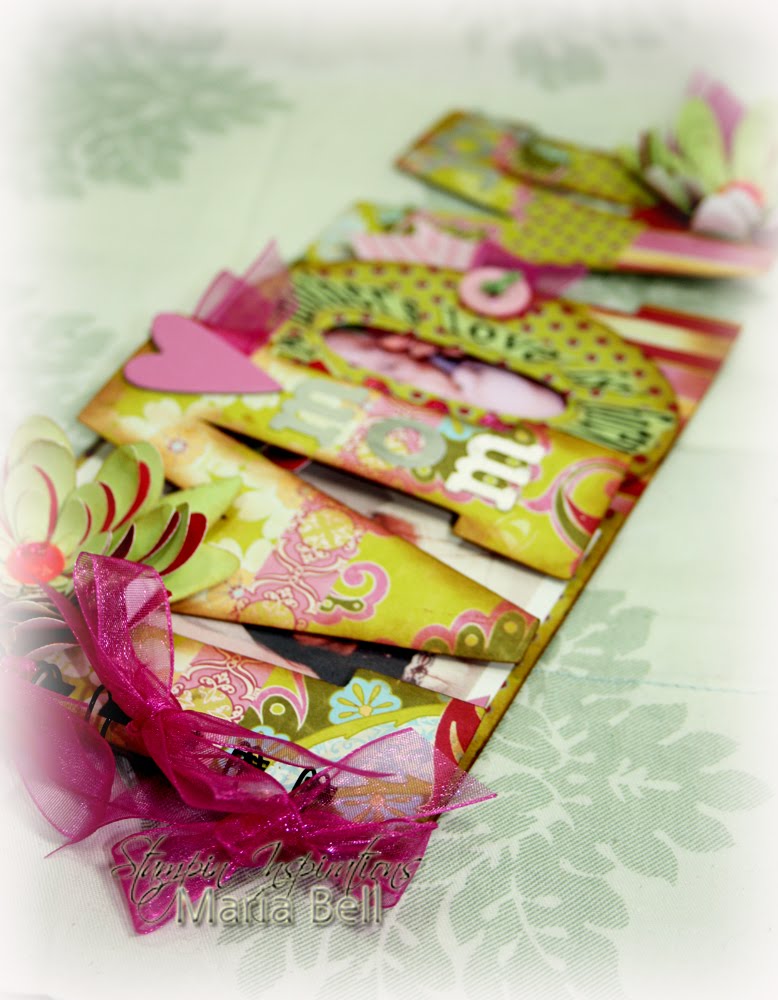
Cutting Files: myscrapchick.com $1 Cut Flowers and Mom Word Album
Papers: K&Co designer paper, SU Pretty in Pink, Certainly Celery
Ink: Tim Holtz distressing Ink
Accessories: SCAL2 program, Cricut Expression, Darice rhinestones, Dew Drops, Making Memories Metal alpha, Making Memories chipboard, Bind it All, Organdy Ribbon, Making Memories Ribbon, Fiskar Scallop Scissors, alpha stickers, buttons, embroidery floss

Related Posts Plugin for WordPress, Blogger...
 
Share |